Tax & Reports — lodgements and signatures
Books › Tax & Reports has two tabs: Lodgements & obligations (what must be filed, and the signature gate in front of it) and Reports (ledger-current statements where every figure traces to its journal lines).
The rule here is PB-B4, and it is charter law: every government lodgement — every jurisdiction — waits for a human signature. Odette assembles and lodges; only you sign.
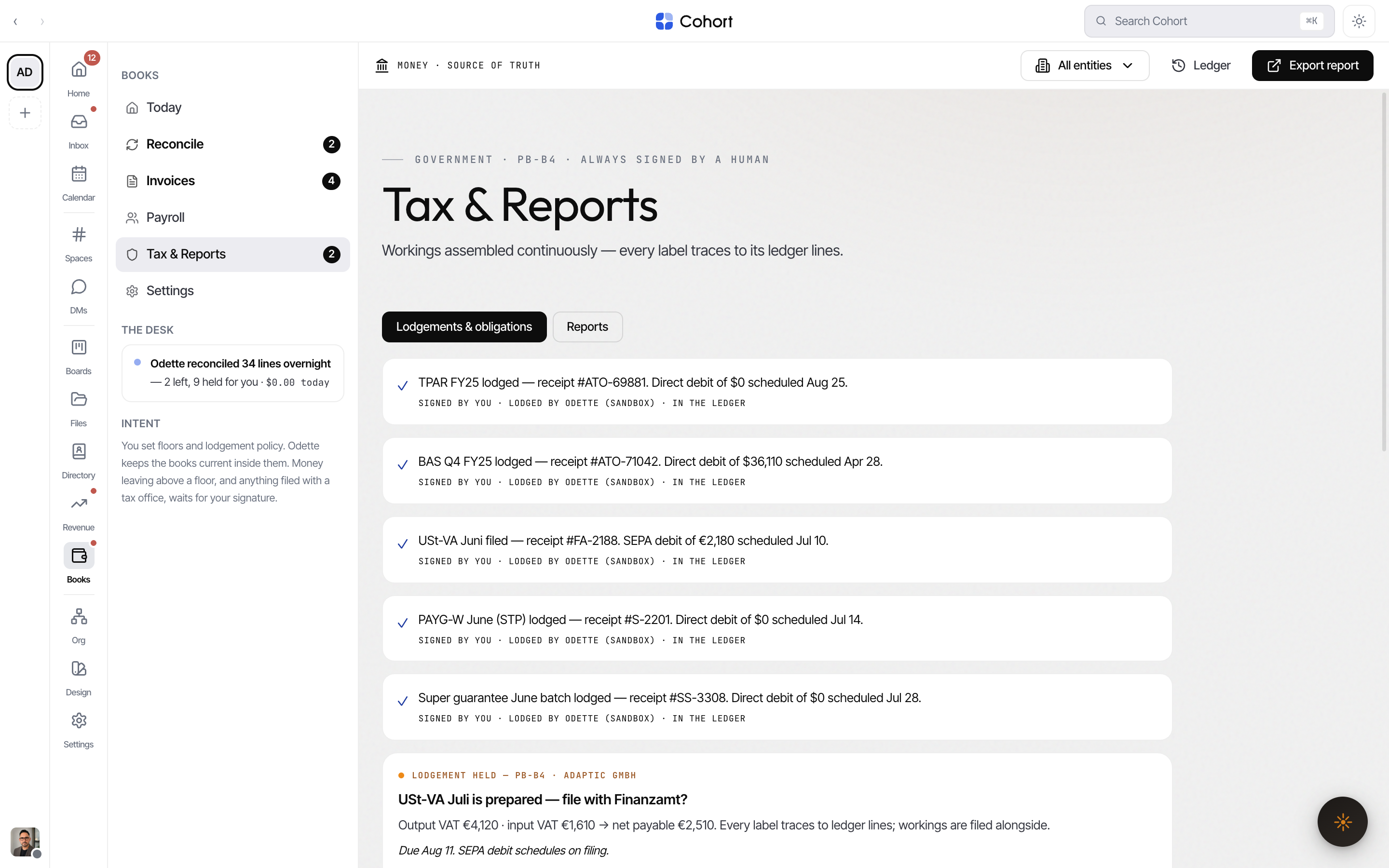
Sign and lodge an obligation
A prepared obligation arrives as a held card ("LODGEMENT HELD — PB-B4 · ALWAYS SIGNED BY A HUMAN") with three actions:
- Review workings
Opens the workings modal. Every labelled figure (e.g. BAS labels) carries a → Ledger link listing the exact journal lines behind it — journal number, account, memo, actor and playbook clause. Lines posted by an invoice, bill or pay run deep-link to their source record. Download CSV exports the workings as real bytes.
- Sign & lodge
The primary button reads Sign & lodge for the ATO entity and Sign & file for the German entity (ELSTER). Signing lodges through the sandbox gateway and writes the receipt to the ledger; the card flips to its resolved state ("SIGNED BY YOU · LODGED BY ODETTE (SANDBOX) · IN THE LEDGER").
- Or return it
Return to Odette sends the obligation back for re-assembly with your note.
PB-B4 has no off switch and its mandate cannot be edited or delegated from Books — changing it is a charter amendment. See Books settings.
Track the obligations calendar
Below the cards, the calendar lists upcoming obligations with due dates and states — Assembling, Held for signature, and so on. An assembling obligation offers Re-prepare now so you don't wait for the cadence. Lodgement history lists every past filing with its receipt number — the receipt number is the record.
Read the reports
The Reports tab holds three ledger-current cards:
| Report | Period | Notes | | ------------- | ----------------------------------------- | ---------------------------------------------------------------------------- | | P&L | Period chips with real per-period figures | Open the slide-over to switch periods | | Balance sheet | As of now | Single period | | Cash flow | Next 90 days | Forecast grounded in pipeline and run rates; re-runs when the pipeline moves |
Every figure carries the same → Ledger trace as the workings. Open expands a report into a slide-over; Download CSV exports the shown period. The toolbar's Export report action jumps straight here and opens the first report.
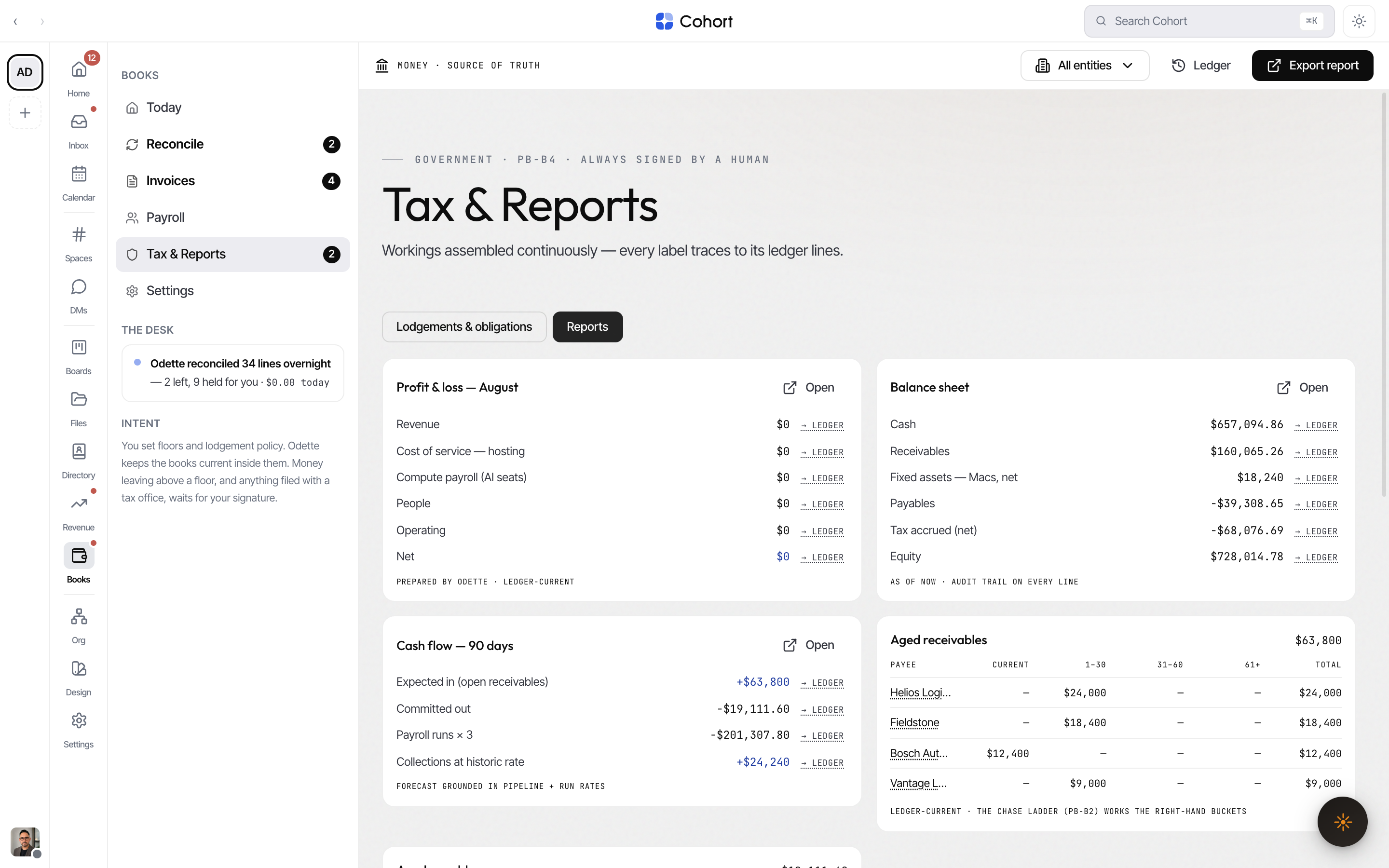
Chase from the aged buckets
Aged receivables and Aged payables bucket balances into Current, 1–30, 31–60 and 61+ days — the oldest bucket renders amber, because it is the chase ladder's target. Each payee name deep-links to the Invoices list filtered to them.
Run the asset register
Fixed assets — register lists each asset with its number, method ("STRAIGHT LINE · 4Y"), cost and book value.
- Run depreciation [period] appears when assets have no run this period; depreciation posts as SYSTEM, logged like a colleague.
- Dispose… takes sale proceeds (0 for a write-off); proceeds land in Operating and the difference posts to gain/loss on disposal — the full derecognition journal.
Assets enter the register when a captured bill carries an asset line.