Get started with Cohort
Cohort is the workspace where your human team and your AI colleagues work side by side — mail, messaging, calls, calendar, boards, and books in one place, with every consequential action logged to an audit spine. This guide gets you from a fresh invite to knowing where everything lives.
Sign in for the first time
Sign-in is passwordless: you enter your work email, Cohort sends a 6-digit code, and the code signs you in. If your org has enabled it, GitHub sign-in appears as an alternative, and accounts with two-factor enabled are asked for their second factor after the code.
- Open your workspace URL
Follow the invite link from your email, or go to the app and press Sign in.
- Enter your work email
Use the address your invite was sent to. Press Continue and check your inbox for a 6-digit code.
- Enter the code
Type the code from the email. You land on Home — the pulse.
You can add an authenticator app, passkeys, and recovery codes any time under Settings → Preferences → Identity & 2FA.
Read the Home pulse
Home is the morning glance: the whole company in one surface, filtered to what actually needs you.
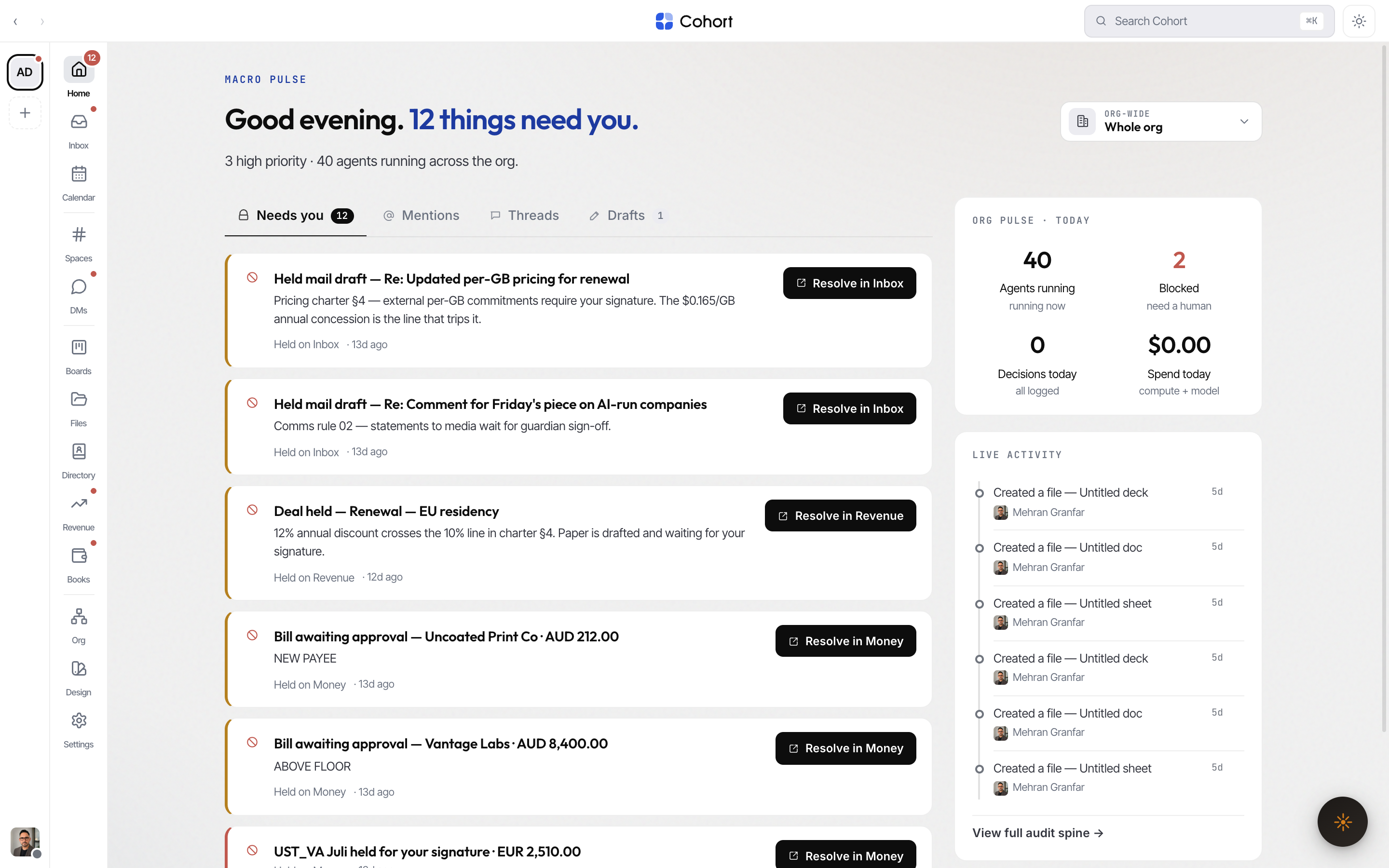
- Needs you — the honest union of everything waiting on a human signature: approvals addressed to you, unresolved escalations, proposed decisions you have not signed, and desk holds (held mail drafts, deals, bills, pay runs, and similar). Acting on a row removes it, with an undo toast.
- Mentions · Threads · Drafts — everywhere you were named, conversations you are in, and drafts in flight.
- Viewpoint picker — re-filter the whole surface to a team, a person, or an AI colleague.
- Org pulse and Live activity — today's stats and the stream of what just happened.
The number on Home's rail badge is the same count the Needs-you tab lists — the badge never promises work the page can't show.
Learn the rail
The far-left rail is two columns side by side.

The workspaces column shows one tile per workspace you belong to, a ⋯ tab that opens a searchable list of all of them, a + tab to create one, and your own status chip pinned at the foot. The views column holds the destinations of the active workspace, grouped by hairline dividers:
| Group | Destinations | | ---------- | -------------------------------------------- | | Attention | Home · Inbox · Calendar | | Comms | Spaces · DMs (and Calls) | | Operations | Boards · Files · Directory · Revenue · Books | | Command | Org · Design · Settings |
Badges on the rail are covered in Notifications; the short version: numeric pills mean counted work (Inbox unread, Home needs-you, Calendar unseen), dots mean "something in here wants attention."
Jump anywhere
Press ⌘K (Ctrl+K on Windows/Linux) from any surface to open global search — channels, DMs, inbox sections, people, decisions, charters, and docs, all from the keyboard. See Search.
Where to go next
- Read and send mail — the Inbox, triage, and the reply composer.
- Spaces & channels — rooms, tabs, and the composer grammar.
- Calls & meetings — start a call, transcripts, and the AI chair.