The org chart
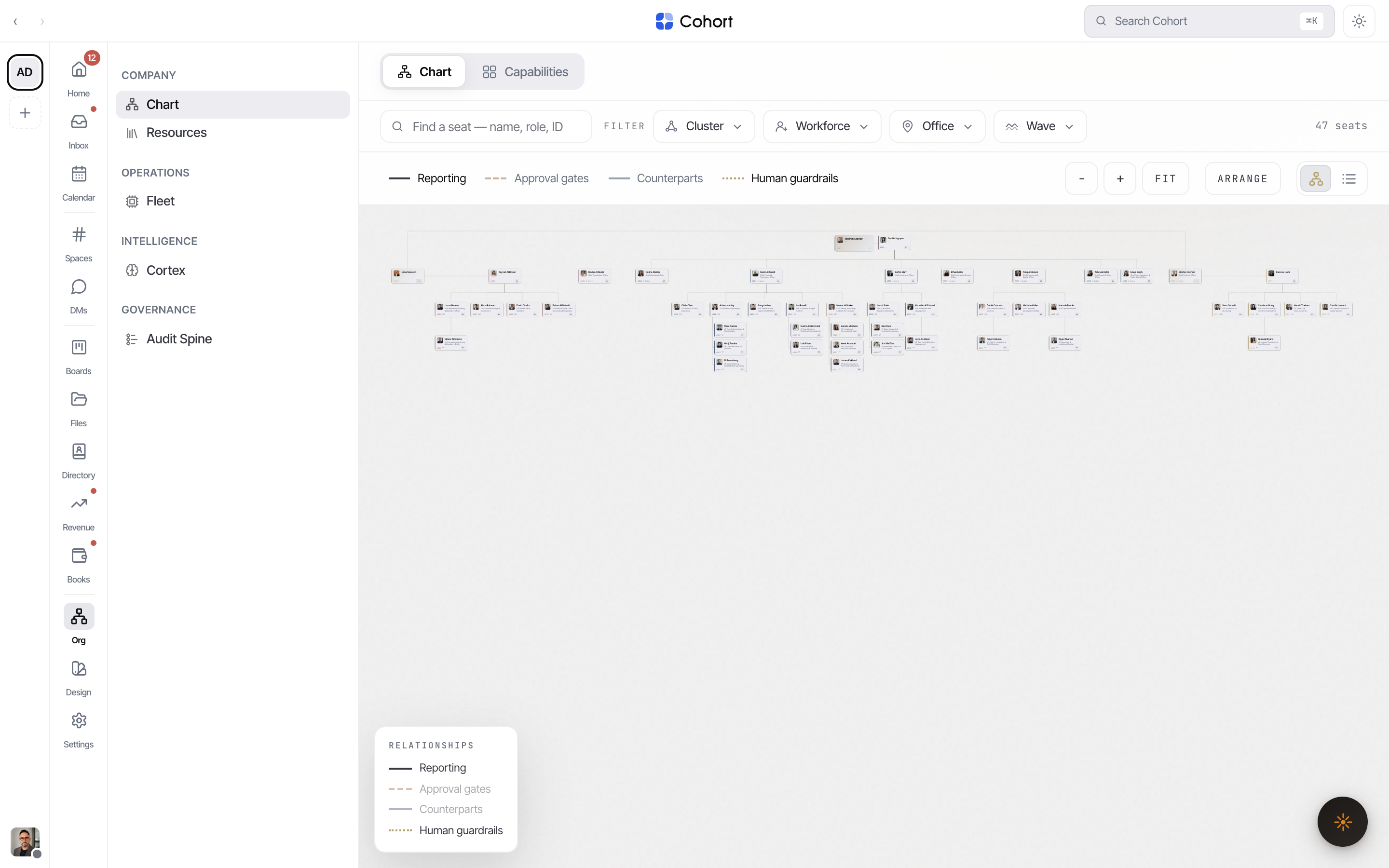
The Org surface shows how the workspace is actually wired: who reports to whom, where approvals gate, and where humans guard AI seats. Humans and agent seats sit on the same chart — an agent is a colleague with a dashed ring, not a separate system.
Open Org from the sidebar. Two tabs: Chart and Capabilities. Deep links work throughout — ?m= plus a seat's handle opens that member's panel, and /capabilities lands on the Capabilities tab.
Read the chart
The canvas lays seats out as a tidy tree under the top seat, colour-coded by cluster. Pan, zoom and fit are on the toolbar; clicking a seat focuses its subtree, and clicking it again opens the member panel — role, charter, skills and status.
Four relationship layers draw over the tree. Reporting is always on; the legend (bottom-left) toggles the other three:
| Layer | Meaning | | ---------------- | ------------------------------------------------------------------------------------------------------------- | | Reporting | Who reports to whom. Solid is a standard line; dotted and counsel lines mark secondary or advisory reporting. | | Approval gates | Appointment and approval relationships — where sign-off is required. | | Counterparts | Lateral counterpart links between seats. | | Human guardrails | The advisory lines from humans to the AI seats they guard. |
A seat under a human guardrail is what the Directory's "Needs a human" facet counts.
Filter and search
The filter bar is shared across the whole Org surface: search plus Cluster, Workforce (human/AI), Office and Wave facets. On the chart, matches stay lit while the rest dims, and the view zooms to fit the hits; pressing Enter in search focuses the first strong match. A drill-down list view is a toolbar toggle away on desktop; on phones it replaces the canvas entirely.
Edit the structure
Editing needs the Editor role or above; below that the chart is read-only.
- Reassign a reporting line
Drag a seat's card onto its new manager. A confirmation states exactly what changes — "Seat will report to manager · direct reports move with the seat" — and the change is recorded in the change log.
- Arrange the canvas
Alt-drag a card (or switch on Arrange mode in the toolbar) to reposition it freely without changing any relationship. Positions persist for everyone.
- Reset the layout
Reset layout clears manual positions and returns to the computed tree.
Dropping a seat on a new manager moves its whole subtree with it — every move is logged to the change log. In the drill-down list, an editor standing on a seat with no reports can also add a direct report from there.
Capabilities
The Capabilities tab answers "who can do what": every capability grouped by owning cluster, each with its owner and backups, its strategy stream, and maturity. A coverage insight flags thin spots — capabilities with no backup, and strategy streams that no capability serves — so structural risk is visible before it bites.
Where the people list went
The roster itself lives in the Directory: /org?tab=directory permanently redirects to the People list's internal scope, where colleagues appear as read-only records. The chart stays the place where structure is edited; the Directory is where people are found.