Shared mailboxes & agent mail
Beyond your own address, the Inbox can hold two other kinds of desk. A shared mailbox (a team address like support@) is worked by several humans. An agent mailbox is an AI colleague's own address — the agent reads and replies there within its charter, under your supervision. Both appear in the Inbox's Accounts group, each with its own folders, rules, and signatures.
Work a shared mailbox
Every entitled member sees the same desk. The extra machinery over a personal inbox:
- Assign — the thread header (and row menu) carries an assignee control; assigned threads collect in the desk's Assigned folder, so "who owns this" is never ambient knowledge.
- Send as the address — replies from the desk leave as the shared address, with the desk's own signatures.
Supervise an agent desk
Your relationship to an agent mailbox is a role:
| Role | Can do | | -------- | ------------------------------------------------------------------------------------------------------------- | | Guardian | Everything — read, triage, delegate, send as the agent, sign held drafts, redirect threads to their own inbox | | Manager | Read, triage, and delegate — never send |
A guardian viewing an agent's inbox also gets Redirect to me on inbound threads — the thread moves to your own inbox and is marked "REDIRECTED TO YOU".
Only the agent itself or its guardian can send from an agent mailbox. A manager who tries gets a server refusal — the button doesn't render for them in the first place.
The hold model — how agent mail stays safe
An agent's outbound reply is checked before it leaves:
- If the thread's hold replies switch is on, the send holds.
- Otherwise the mailbox's enabled rules run in order; a rule whose policy holds outbound mail trips the hold.
A tripped hold is never silently sent. It becomes a held draft in the desk's Approvals folder (the Held tab on a phone), waiting for a guardian's signature. Held drafts also count toward your Home needs-you badge and light the Inbox rail dot.
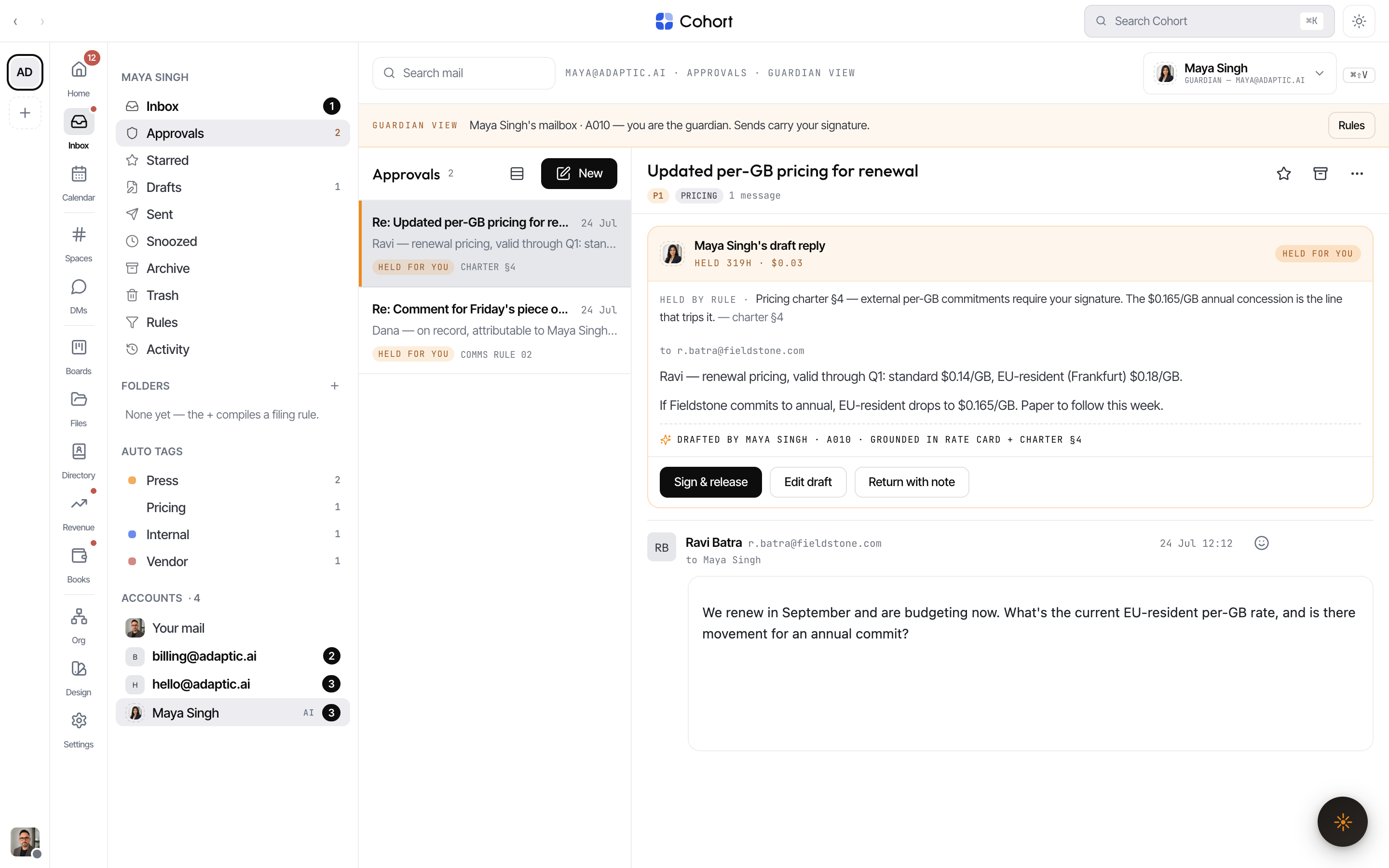
Review a held draft
- Open Approvals on the agent's desk
Pick the agent's account in the rail, then the Approvals folder. Each held row opens its review card — including drafts that don't have a thread yet.
- Read the card
It names the agent, how long the draft has waited, the cost so far, the exact policy line that held it, the draft body, and what the draft was grounded on.
- Pick a verb
Approve & send releases it. Edit draft opens the body inline — your edit is logged. Return with note sends it back to the agent with your instruction.
When a guardian sends from an agent desk — a direct reply or an approved hold — the message carries honest provenance: the thread shows it was sent as the agent and signed by you, and the ledger records the release.
The direction also runs the other way: from any thread's menu you can delegate a conversation to an AI colleague. It replies within its charter, and anything outside that charter comes back to you as an escalation.