Invoices — receivables & payables
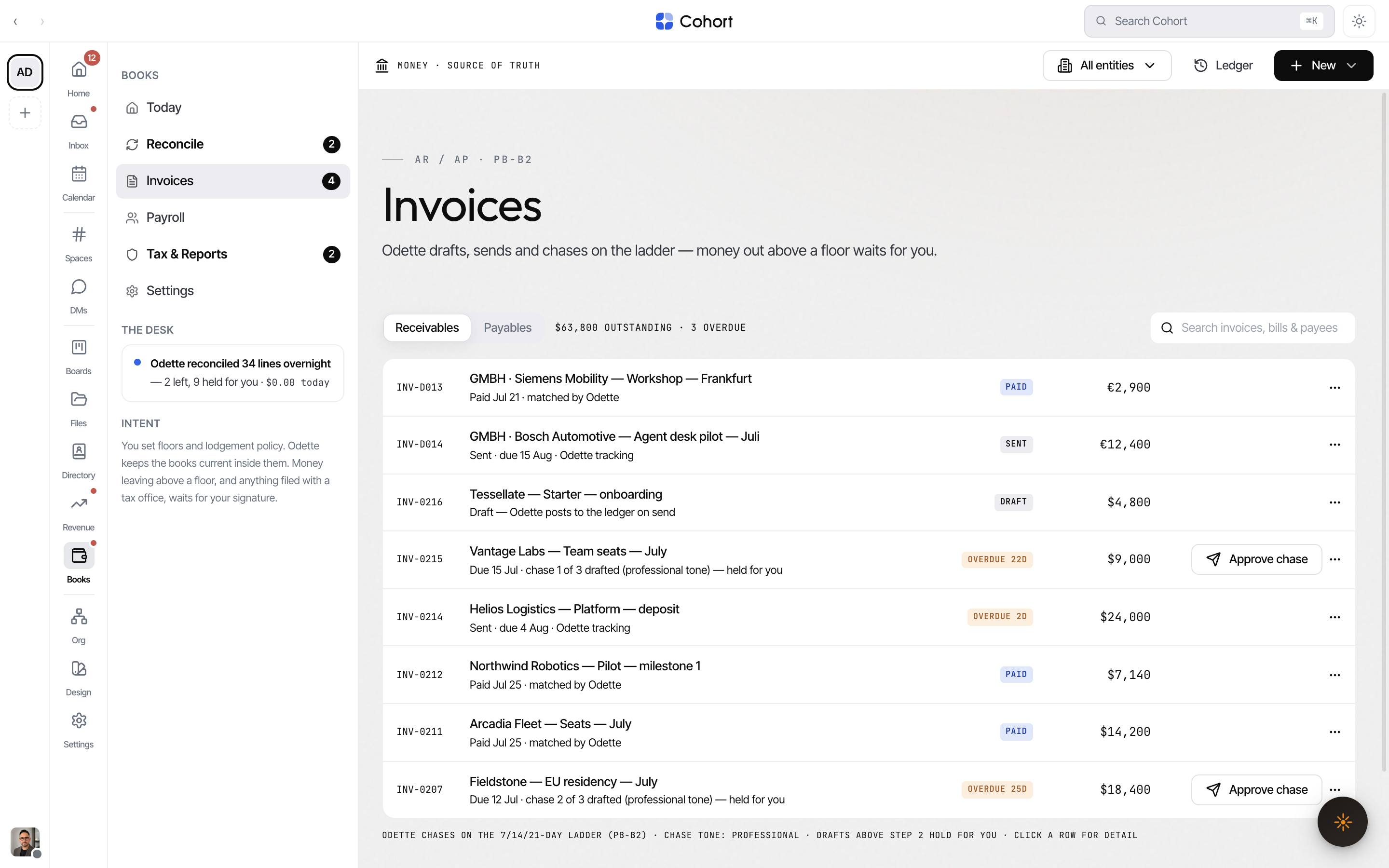
Books › Invoices is one page with two sides, switched by the Receivables / Payables control (the side rides the URL as ?seg=ar or ?seg=ap):
- Receivables — invoices you issued. The meta line shows the outstanding total and the overdue count. Odette chases on the 7/14/21-day ladder (PB-B2).
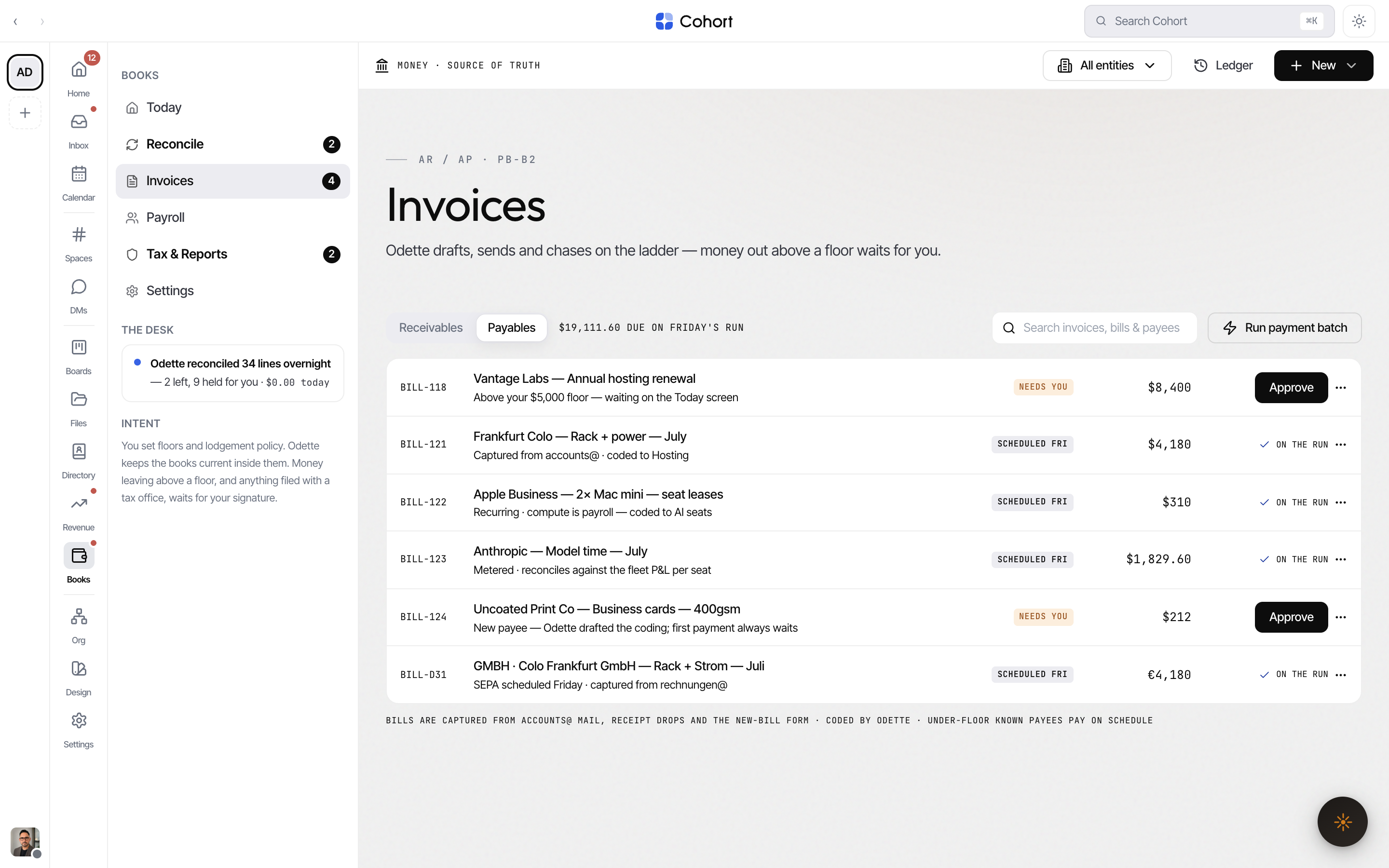
- Payables — bills captured from accounts@ mail, receipt drops and the New-bill form, coded by Odette. The meta line shows what is due on Friday's payment run.
The search field filters both sides by number, payee and description. Deep links from the aged reports arrive here pre-filtered.
Raise an invoice
- Open the composer
Click New in the Books toolbar and choose Invoice (available from any Books page).
- Pick the entity
The entity sets the currency and tax treatment — GST 10% included for an AUD entity, USt 19% included for a EUR one.
- Pick or add the customer
Choose from the customer picker, or type a new name — the picker upserts a payee record for free-text names.
- Add lines and terms
Each line takes a description and a tax-inclusive amount. Pick NET 7, 14 or 30 due terms.
- Create & send, or save as draft
Create & send posts the AR journal and arms the chase ladder. Save as draft creates the record without sending — send it later from the row menu.
Understand invoice statuses
| Status chip | Meaning | | ----------- | ----------------------------------------------------- | | DRAFT | Created, not sent — no journal posted yet | | SENT | Sent and awaiting payment | | OVERDUE | Past due (the chip shows the age, e.g. "OVERDUE 12D") | | PART_PAID | Partially settled | | PAID | Fully settled | | VOID | Voided — row dims, can be reinstated |
Work a receivable
Right-click a receivable row (or use the row's actions button on smaller screens):
- Send now — for drafts.
- Record payment… — enter an amount received.
- Send reminder now — one-off nudge outside the ladder.
- Record promise to pay… — logs a promised date and pauses the ladder; the row shows "PROMISED", with the date.
- Send statement of account — full statement to the payee.
- Copy payment link — copies the invoice's stored payment link (sandbox or Stripe; Stripe settlements post back to the invoice).
- Issue credit note… — amount and reason.
- Void invoice… — undoable from the toast, and reversible later via Reinstate.
Approve or hold a chase
The ladder sends step 1 on its own; drafts from step 2 up hold for you. A held row shows Approve chase inline. Opening the record shows the full draft ("Chase 2 of 3 — held for you") with two choices: Approve & send or Hold. The chase tone (professional, friendly, firm) is set on Today under PB-B2.
Approve bills and run the batch
On Payables, bills over your floor — and first bills from new payees — arrive as AWAITING APPROVAL. Approve them inline, or open the record for the coding, the provenance line and the trail, then Approve & schedule or Return to Odette. Under-floor bills from known payees schedule themselves and show when they pay.
Other bill actions from the row menu:
- Pay now (outside the batch)… — for a scheduled bill that cannot wait for Friday.
- Hold this payment — pulls a scheduled bill back to held.
- Dispute with payee — returns it to Odette, who drafts the dispute email.
Run payment batch (top right of Payables) signs the scheduled run so it executes — the batch action, like everything here, returns a ledger id.
Approving a bill, a chase draft, or the payment batch requires a human seat. Agent lanes cannot sign — the server refuses regardless of how the call arrives.
Open a record
Click any row to open the record panel: line items, the attributed Trail of everything that happened, and notes. From the record you can also:
- Open counterparty in Directory — jumps to the organisation behind the payee. If no Directory record exists yet, Books tells you so (accepting a feed match or capturing a bill proposes one).
- Download the PDF — builds a real PDF from the record and stamps a chain event.
Bank-line matching that feeds this page is covered in Reconcile. How a won deal becomes a draft invoice is covered in From Revenue to the money desk.