Books settings — entities, mandates, automation
Books › Settings is the desk's control room, in four tabs: Entities & jurisdictions, Mandates & policy, Automation and Connections. Every save, removal and toggle here is versioned and logged; removals offer Undo on the toast.
Add or manage a legal entity
Each entity card shows its legal name, jurisdiction and tax office, registrations, base currency and consolidation, who keeps the books, and office / financial-year / retention details.
- Add the entity
Click Add entity and fill the fields — legal name, jurisdiction and tax office, registrations, base currency, books keeper, office details.
- Let Odette scaffold
On create, Odette scaffolds the chart of accounts, the registrations checklist and the filing calendar. Nothing files without your signature.
- Manage later
Manage on a card edits the same fields; Archive entity… retires it (undoable). Changes version to the ledger and filings continue uninterrupted.
The footer notes the consolidation rules: consolidated in the base currency, intercompany eliminated, FX at RBA/ECB daily rates.
Set who signs what
Mandates & policy lists approvals and mandates — each row names a person or agent, what they sign or approve, and the limit or scope.
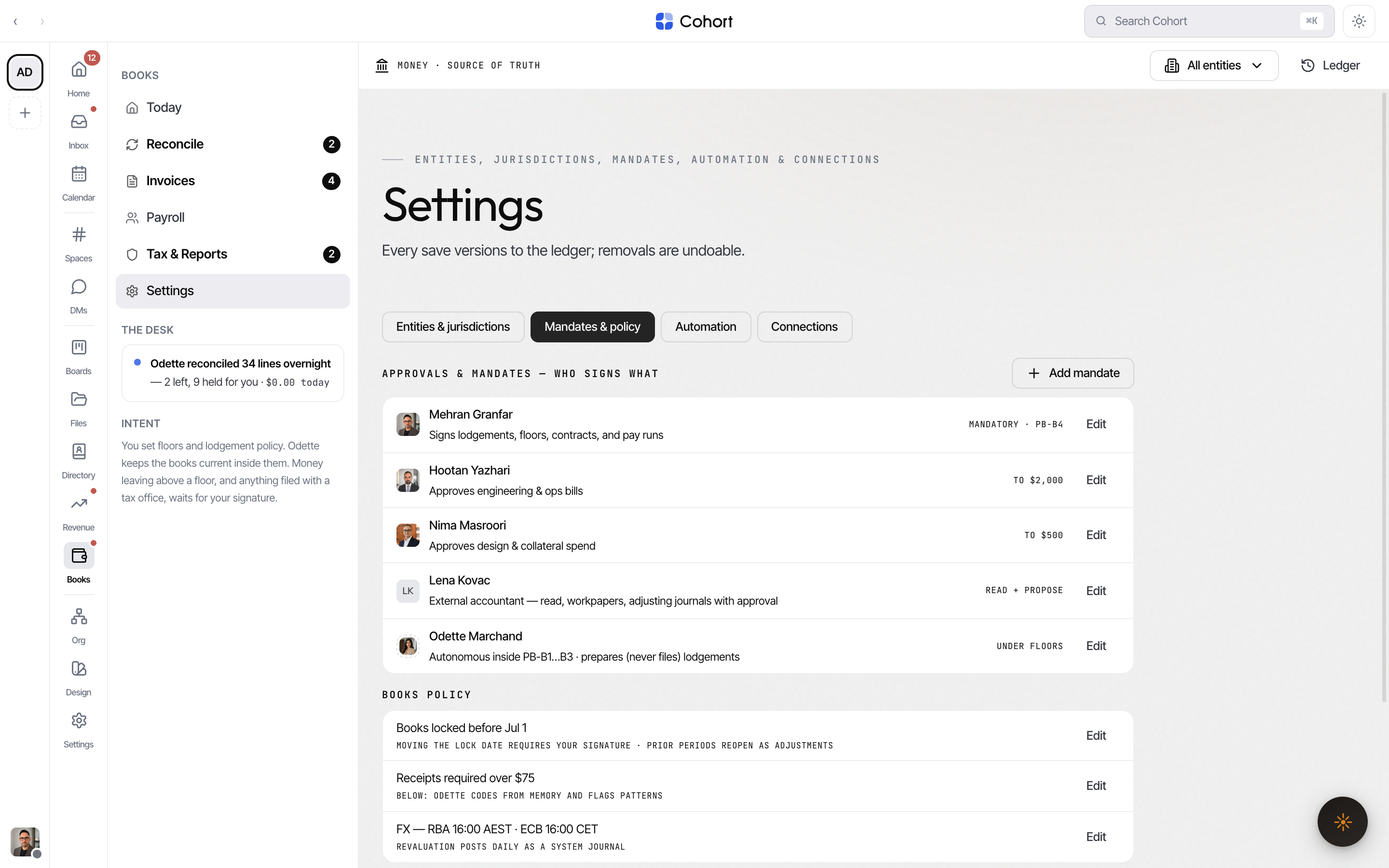
- Add mandate creates one (who, what they approve, limit). New mandates take effect immediately and are versioned.
- Editing a mandate re-routes approvals in flight.
- The charter-locked mandate — the human signature on lodgements, floors, contracts and pay runs — cannot be edited or delegated here. Changing it is a charter amendment: drafted, signed by the founder, and logged.
- Odette's own row routes you to the playbooks on Today — her authority is the floors and ladders you set there.
Tune books policy
Three policy rows sit under the mandates:
| Policy | What it sets | Note | | ----------- | ---------------------------------------------- | ---------------------------------------------------------------------- | | POL-LOCK | The period-lock date ("Books locked before …") | Moving it requires your signature; prior periods reopen as adjustments | | POL-RECEIPT | The receipt-required threshold | Below it, Odette codes from memory and flags patterns | | POL-FX | The FX source | Revaluation posts daily as a system journal |
Pause all autonomous execution
The red switch at the bottom of Mandates & policy is the kill switch (PB-B0). While paused, Odette keeps drafting and queueing, but nothing posts, pays, chases or files until you resume. The desk status flips to "Odette is paused", and resuming restores only what the switch paused.
Schedule automation
Automation lists the desk's scheduled tasks with their cadence. Per task:
- The switch pauses or resumes it — pausing holds its queue, loses nothing.
- The pencil edits name and cadence (cadence changes apply from the next run).
- Add scheduled task creates one; new tasks draft-run once for your review before going unattended.
Scheduled tasks run as their seat and log like any colleague.
Connect feeds and gateways
Connections lists the bank feed and the filing gateways (SBR, ELSTER, DATEV and any others), each with status. Gateway credentials are machine-held: Odette prepares changes and renewals, and you authorise them.
- Renew refreshes a credential that is due.
- Manage edits a connection; Disconnect… removes it (undoable).
- Connect a feed or gateway adds one — Odette prepares the credential and scopes it read-only where possible; you authorise the grant.
This page governs the money desk only. Workspace-wide settings — members, integrations, API keys, billing — live under Settings; see Your settings.