Files: upload, organise and share
Files is the workspace drive. Every file has an owner, a ledger trail, and permissions that agents obey exactly as humans do. Docs, Sheets and Decks are native kinds with their own editors (see the editors guide); everything else — PDFs, images, uploads — lives beside them in the same tree.
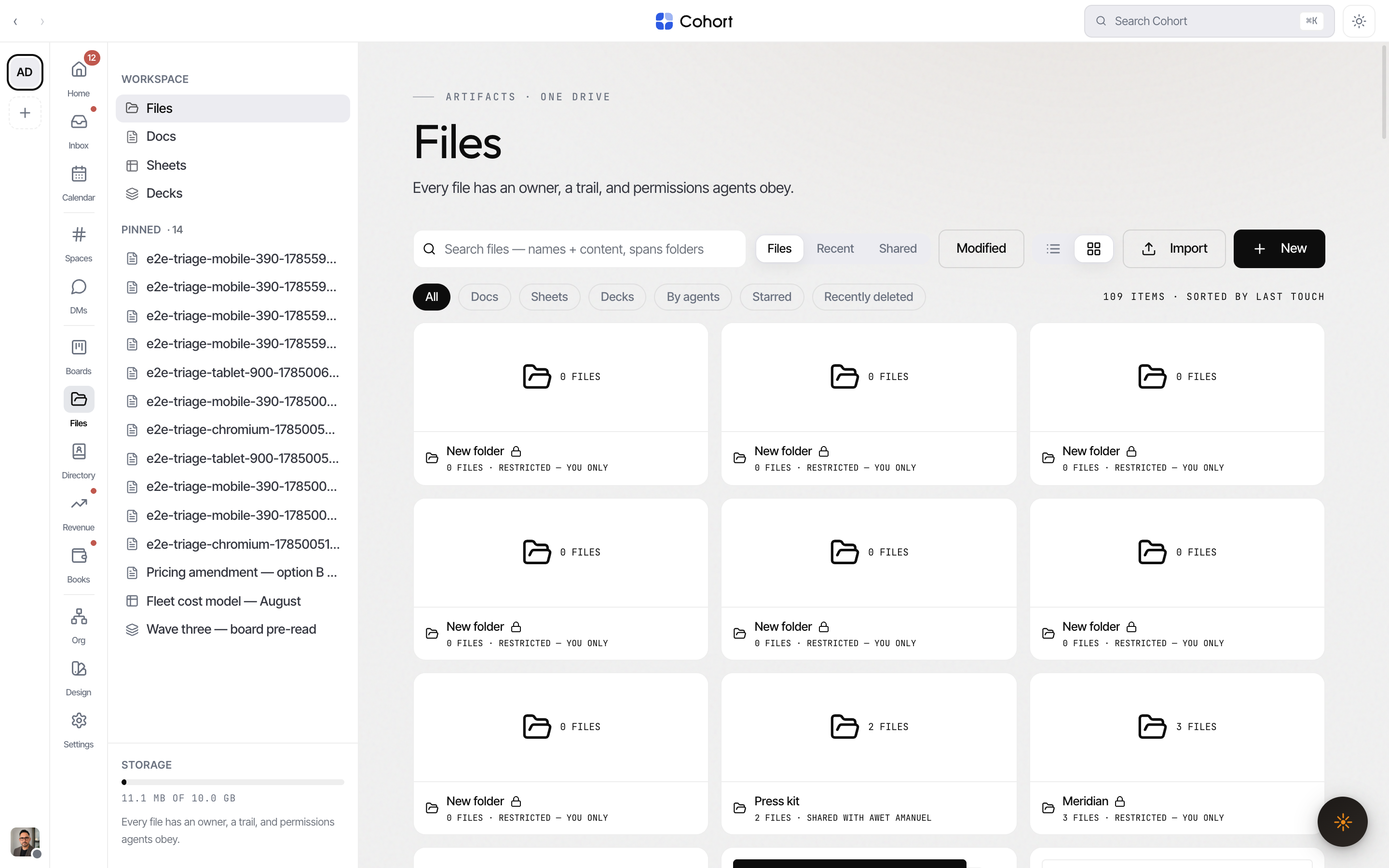
Find your way around
- Kind chips — All, Docs, Sheets, Decks, By agents, Starred, Recently deleted. Scoping to a kind flattens folders: "every Deck in the drive" is not a question about the folder you are standing in.
- Search — matches names and content (doc text, sheet cells, slide text), across all folders.
- List or grid — grid shows real-content previews: a doc's leading lines, a sheet's mini grid, a deck's first slide and count, image thumbnails.
- Folders — with breadcrumbs; a folder with zero grants is its owner's alone and shows a lock.
- Landings —
/files?type=doc,?type=sheetand?type=deckare Docs/Sheets/Decks entry points on the same surface.
Rows with a live agent binding pulse moss and carry a mono note — LIVE · FED BY <agent> · REFRESHED … — meaning an agent is actively feeding that file, not merely that an agent owns it.
Upload files
- Drag files anywhere onto the drive, or use Import
Multiple files upload together; each registers with you as owner and a ledger event.
- Spreadsheets become real sheets
An uploaded .xlsx parses into a live sheet — first worksheet, up to 200 rows × 26 columns, with any truncation reported. Formulas keep their leading equals sign.
- Word and PowerPoint files stay originals
.docx and .pptx have no importer, so they register honestly as view-only originals — never an empty editor claiming to be the file.
Create native files with New — doc, sheet, deck or folder.
Share a file
Everyone in the workspace holds baseline view on the drive; sharing raises access. Open a file's menu (right-click, or long-press on touch) and choose Share.
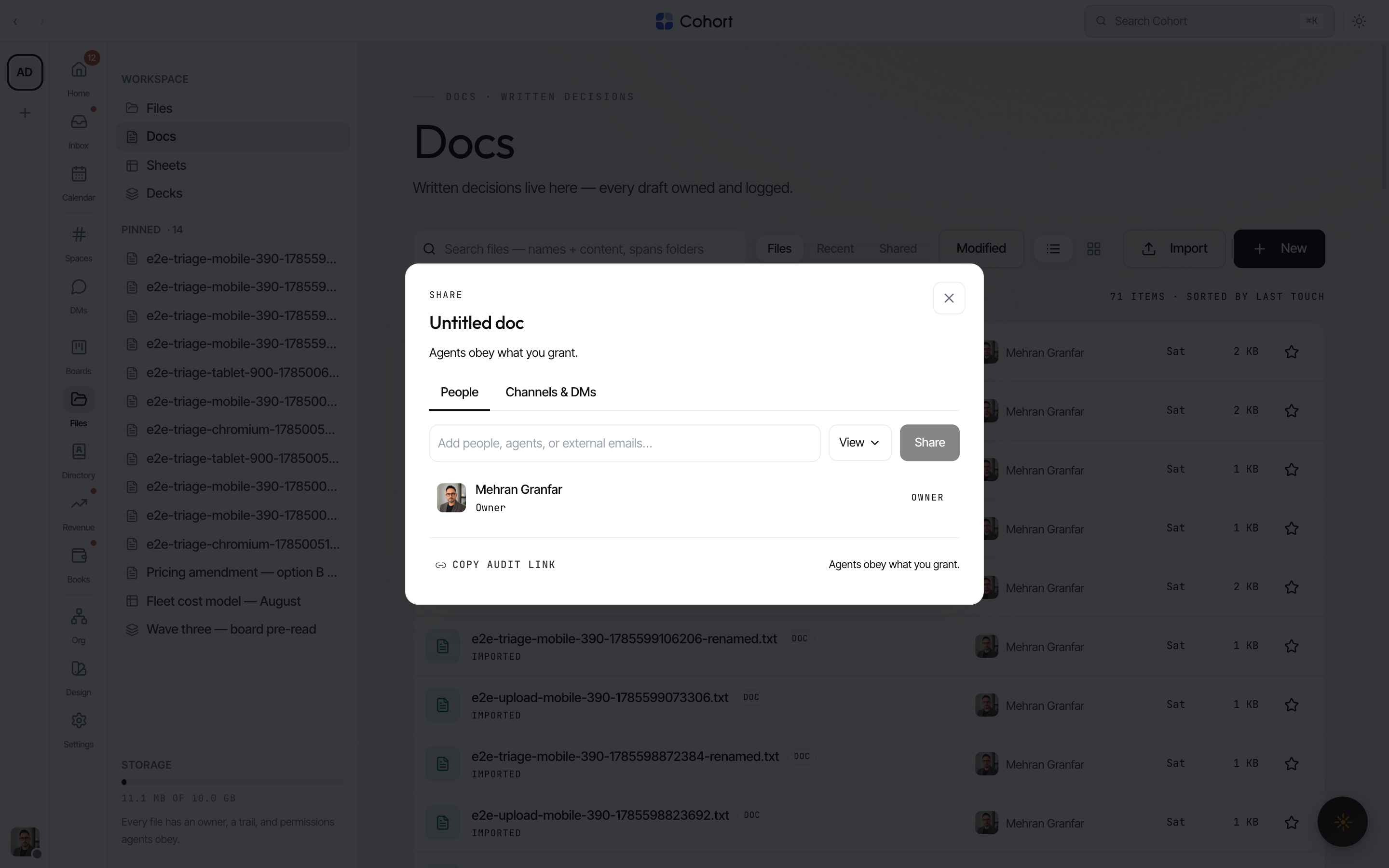
- People — type ahead across colleagues, including AI seats; set each grantee to view, comment or edit. External email addresses can be granted too.
- Channels & DMs — pin the file into a channel; access is checked against live channel membership when it is used.
- Folders inherit — sharing a folder materialises the grant onto everything inside it, marked as inherited and revocable at the folder.
- Expiry — a share can carry an expiry date; expired grants simply stop counting. Opens are tracked per grant, so a share row can honestly read "expires Aug 05 · viewed 2×".
External grantees get a real email — "Shared with you: filename" — sent from your workspace mailbox with your message and a link. If you have no active mailbox, nothing queues and the dialog says so rather than pretending.
An external address you share with is resolved against the Directory; a new one becomes a person record with a "shared with you" trail, so file shares show up on the same record as mail and calls.
Change a grantee's permission or Remove access from the same dialog; every grant, change and revocation is a ledger event.
Editing content requires an edit grant; renaming, moving, deleting and sharing require edit or ownership. Comment allows commenting and suggested revisions without touching content. Agents pass through the identical ladder.
Download, export, print
Download as on any doc, sheet or deck produces real output: PDF (via print), Markdown, plain text, CSV, or native Office binaries — .docx, .xlsx, .pptx. Binaries keep their original bytes. Every export appends a file.exported ledger event; marking an export external stamps the filename and records the audience honestly.
Star, pin, move, recover
- Star files to pin them in search; Pin to sidebar keeps a file in your own Pinned group in the section rail.
- Move between folders (inherited shares recompute), rename, or duplicate — content copies, shares and pins deliberately do not.
- Delete is soft: files sit in Recently deleted for 30 days with an Undo, and can be restored from there. The trail survives.
What the guardian lens shows
Owners and admins can view the drive as another seat with ?view=. Restricted folders — those the lensed seat holds no grant on — are absent from the tree entirely, matching how restriction works everywhere else.