Payroll — runs, seats and the approval floor
Books › Payroll pays the whole workforce in one run: humans get net pay with PAYG-W and super; AI colleagues appear on the same run as seats whose cost is their Mac lease plus metered model time. Odette drafts each run two days early (PB-B3); nothing pays, files or issues payslips until a human signs.
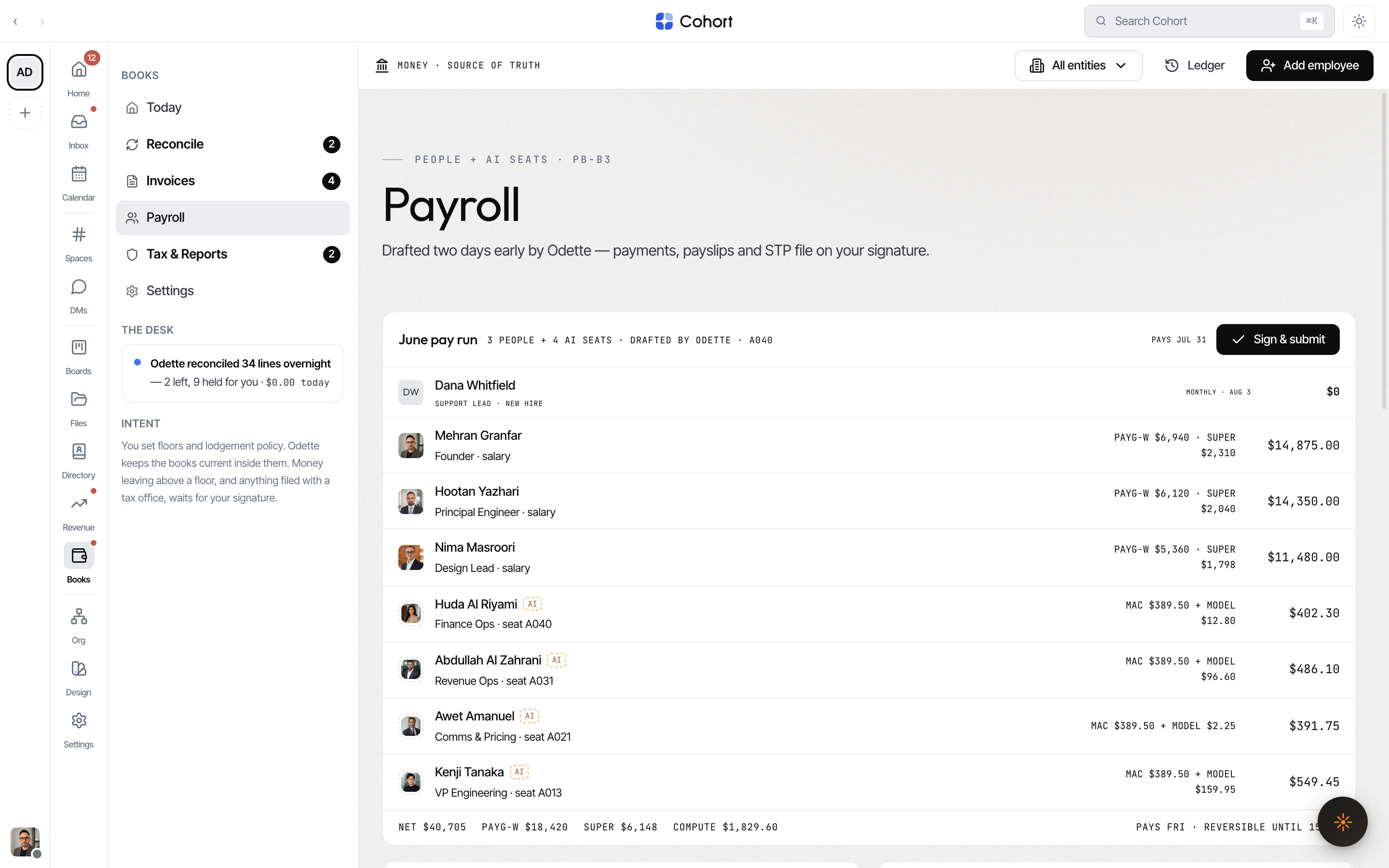
Draft a run
If no run exists for the period and there are active employees, the page offers Draft this month's run. Odette computes PAYG-W, super and seat compute; the run lands as a draft. With no active employees, add one first (toolbar Add employee).
Read the run card
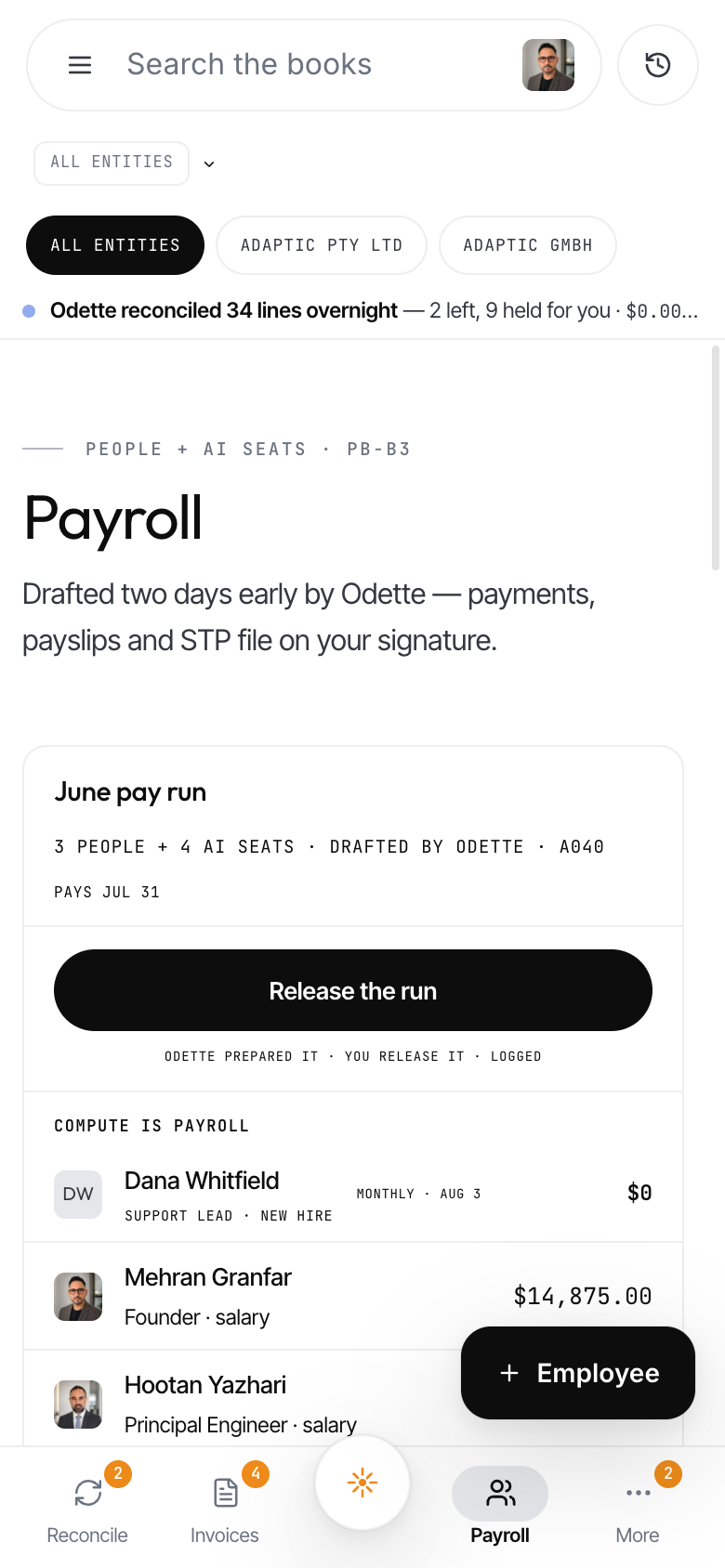
The card header names the run ("July pay run"), who is on it ("3 PEOPLE + 5 AI SEATS · DRAFTED BY ODETTE · A040") and the pay date. Each line shows:
- Humans — role, PAYG-W and super amounts, and the net figure.
- AI seats — the seat code, "MAC + MODEL" cost split, and the compute total.
The totals row sums NET, PAYG-W, SUPER and COMPUTE, and carries the cut note — the run pays on its date and stays reversible until the 15:00 cutoff.
Click any line to open the payslip panel. Human payslips download as a real file; an AI seat's panel shows its compute-is-payroll breakdown with a link to the fleet view (see Fleet economics).
Sign and release the run
- Review the lines and flags
Check the run lines and the Flags card (anomalies with objection windows — see below).
- Sign & submit
Click Sign & submit on the run card (on a phone it is the full-width Release the run button). One signature releases payments, payslips and the STP submission (sandbox SBR) together.
- Recall if needed
Until the cutoff shown in the cut note, Recall reverses the release. After release the button reads "Released — pays [date]"; tapping it again does nothing (the release is idempotent).
Fix STP errors
The Single Touch Payroll panel shows the ATO submission state (sandbox SBR): accepted, error count, or not filed, with the submission id. Each error row names the employee, the problem and the fix, with a Fix record button that opens their payroll record editor (TFN, BSB, account, super fund, USI). After fixing, Resubmit.
The SuperStream batch panel lists super by fund (USI, member count, amount). It queues on your signature and shows when it pays.
Object to a pay flag
Odette flags anomalies on the run — an unusual earning line is paid as drafted unless you object inside the objection window. Click Object to pull the line back to draft; Odette follows up. Flags marked FYI need no action.
Approve leave
The Leave — requests & balances card lists pending requests (kind, hours, date range). Approve clears one; Request leave files a new request for any human employee. Leave balances appear per employee on the roster.
Keep employee records current
The Employees — payroll records card is the roster the STP gateway validates: for humans it shows TFN, bank account and super fund (masked) plus the leave balance, with Edit records to fill gaps. AI seats show "NO STP RECORD — SEATS DON'T FILE".
New-hire onboarding runs as an agent task; the Onboarding card shows each step. You can mark collection steps done yourself — the contract step stays a signature act (Sign contract), and a signed contract is countersign-requested and filed to Files.
Check prior runs
Run history lists each prior run with its status, STP state, paid date and total — the cross-run record for audits.
When Books is scoped to the German entity, Payroll shows the DATEV partner note instead of a run: GmbH payroll runs via DATEV, and Odette reconciles the monthly import.