Running in production
A production agent is one always-on Mac mini supervised by launchd, with a single persistent daemon owning all scheduled work. This page covers keeping it alive, watching it, stopping it, and upgrading it.
Install the launchd jobs
scripts/setup/init-agent.sh      # deps → state dirs → generate-plists.sh → launchctl load
launchctl list | grep ai.maestro
Expect the daemon plus the cadence trigger jobs. The daemon plist is KeepAlive {SuccessfulExit:false, Crashed:true} — it restarts on crash but respects a clean stop. Generated plists live at scripts/local-triggers/plists/ and install under ~/Library/LaunchAgents/ai.maestro.*.
How scheduled work actually runs
Cadence ticks (every 5/10/15/30 minutes, daily, weekly, monthly, quarterly) do not spawn a model session each. Each launchd tick runs a ~10 ms enqueue script that drops an event into state/cadence-bus/inbox/; the persistent daemon's consumer services the queue with per-cadence policy:
- inline — handled entirely in-process (heartbeats, housekeeping, stale-claim sweeps); no model session spawned.
- guarded — a cheap pre-check (queues empty? inbox empty?) escalates only when there is substantive work.
- escalate — spawns an isolated sub-session running that cadence's trigger prompt.
The bus is safe across daemon downtime — events accumulate in inbox/ and drain on the next start — and honours the emergency stop at both producer and consumer. The full lifecycle of every event (received → claimed → processed | escalated | failed | dlq) is recorded under logs/cadence-bus/<date>.jsonl.
Watch it
| Where | What you see |
| ----------------------------------- | ------------------------------------------------------------------------------------------------ |
| scripts/healthcheck.sh | The scheduled health check (also wired via launchd every 15 minutes) |
| state/cadence-bus/health.json | Daemon heartbeat — doctor flags it stale when older than 60 s while the daemon should be running |
| logs/audit/ | Per-action JSONL rows from both the native executor and the MCP plane |
| logs/daemon/<date>-sessions.jsonl | Session lifecycle plus routed events from the model router |
| logs/cadence-bus/ | Cadence event lifecycle |
| state/dashboards/ | Executive summary, cost summary and queue dashboards the agent maintains |
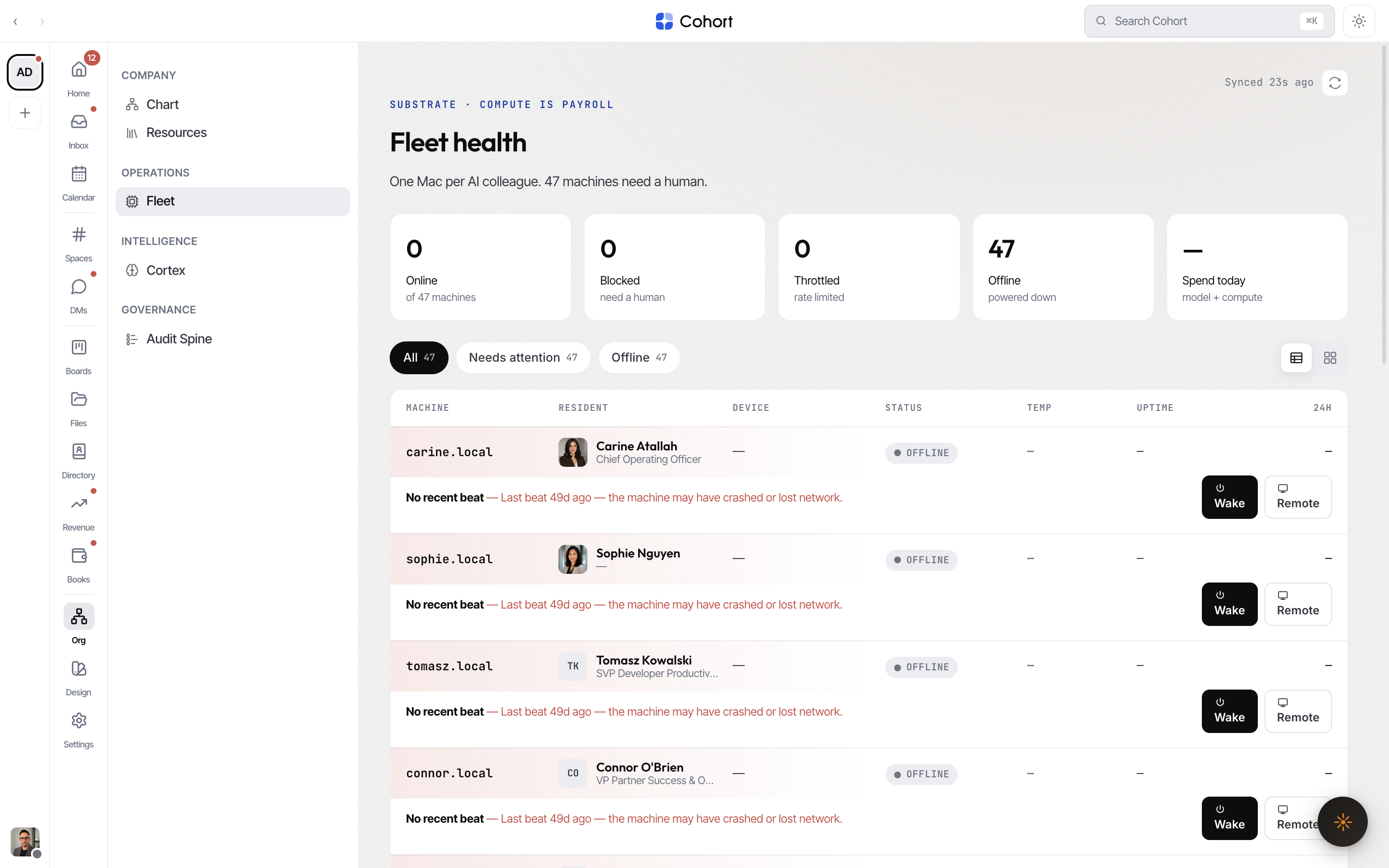
From the workspace side, Cohort → Fleet is the org-level view: one row per agent Mac with live health, the AI-native blocked states (re-auth needed, rate limit, disk full, powered down), per-seat remediation, and a lifecycle drawer.
Stop it
- Emergency stop:
touch .emergency-stopin the repo root (ornpm run emergency-stop). The daemon exits cleanly, so launchd's KeepAlive does not fight you, and both cadence producer and consumer stand down. This flag is deliberately human-only: the recovery watchdog throttles or restarts on memory pressure rather than ever writing it. - Resume:
scripts/resume-operations.sh(ornpm run resume). - Email-only stop: delete or rename
config/orgmail.yamland restart — the mailbox plane skips while everything else keeps running. Server-side, an admin can flip the mailbox to Disabled in Settings → Email. - Org kill switch: an admin can deactivate the agent centrally; its next presence beat carries a halt directive and its token is revoked. See Pairing and credentials.
Upgrade
Two things version independently: the SDK (the CLI and framework source) and the framework files vendored into the agent repo.
npm i -g @cohortapp/agent-sdk@latest   # 1. the SDK itself
npm run upgrade                        # 2. maestro upgrade — copy framework files in
maestro init                           # 3. run any deferred feature-init steps
git diff && git add -A && git commit -m "Upgrade framework"
upgrade classifies every file and never touches agent-owned content (config/, CLAUDE.md, knowledge/, memory/, state/, logs/, outputs/, .env):
| Classification | Behaviour |
| ------------------- | ------------------------------------------------------------------------------------------------------ |
| added / updated | New or unmodified framework file → copied |
| same | Already byte-identical → skipped |
| preserved | Has uncommitted local edits → yours kept; upstream lands at .maestro/incoming/<path> for manual diff |
| mergeKept | Under agents/ → custom agents never overwritten |
| ignored | Matches .maestroignore → never touched |
| forced | Only with --force-overwrite; backup at .maestro/backup/<path> |
Use --dry-run to preview. Upgrades are idempotent — a second run on a current repo is a clean no-op — and legacy launchd plists are auto-migrated to the cadence-bus architecture with the exact launchctl commands printed for any live job you need to roll.
A protocol drift warning from cohort doctor — the server reporting a newer
org-protocol version than the SDK vendors — is the upgrade cue for the
machine.
Fleet hygiene
maestro auditruns the security-posture audit (--fixapplies safe remediations) and produces a hash-locked attestation.- Rotating an org provider key is one action at the workspace — the fleet converges on the next lease with nothing to push.
- When several agents share Slack channels, keep
config/known-agents.jsoncurrent so @-mentions route to exactly one daemon. maestro global-setupwires collective memory into the machine-wide Claude config so every session on the box contributes to the agent's long-term memory; it is additive, idempotent, and run automatically byinit-agent.sh.